Free · No login
Visual Sitemap Generator
Enter any website URL and instantly see a clickable map of its structure — pages, sections, depth, and real screenshots.
Crawling your site…
Enter any website URL and instantly see a clickable map of its structure — pages, sections, depth, and real screenshots.
This is a preview of your first pages.
Sign up free to unlock the full toolkit:
Your preview disappears when you close this tab.
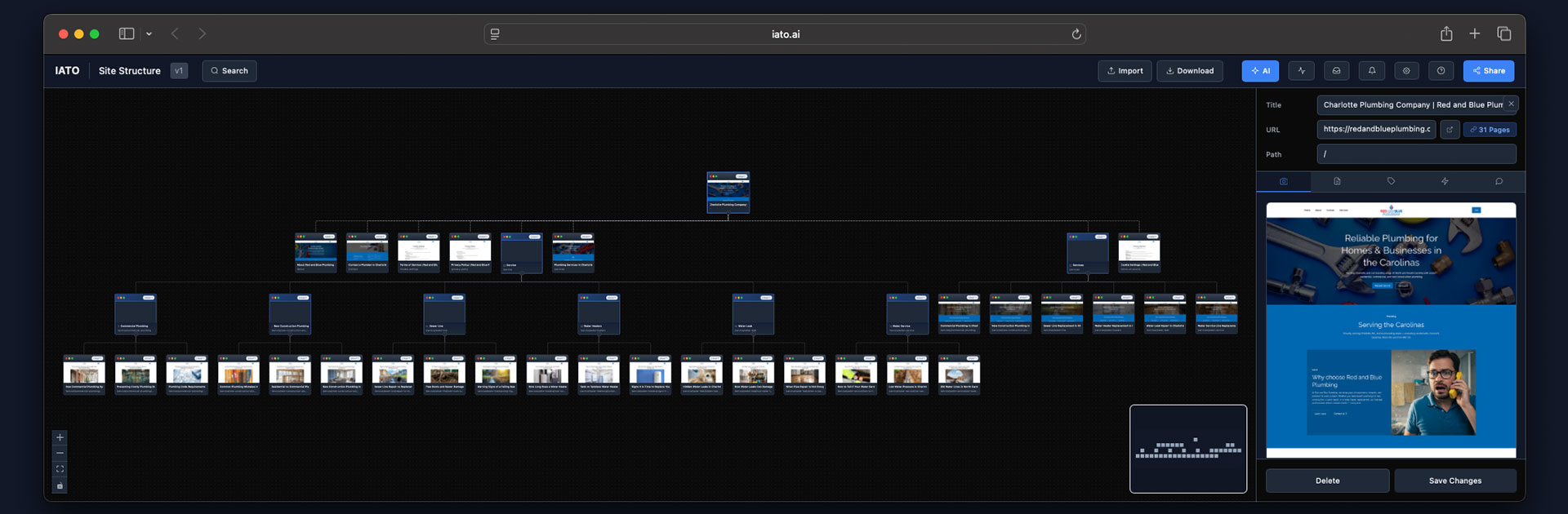
A visual sitemap is a diagram of a website's structure — every page drawn as a node and connected to the pages that link to it, so the whole architecture reads at a glance.
Where an XML sitemap is a flat list of URLs meant for search engines, and a traditional crawler hands you a spreadsheet of rows, a visual sitemap is built for people. You see the home page at the top, the main sections branching beneath it, and exactly how deep each page sits. IATO's generator crawls the URL you enter with a real browser, renders every page (JavaScript included), captures a screenshot of each, and lays the result out as an interactive tree you can pan, zoom, and click into. It's the fastest way to understand a site you didn't build — and to spot the structural problems hiding in one you did.
New to site structure? Start with information architecture and the difference between a visual sitemap and an XML sitemap.
Once the map renders, it's organized top-down by how the site is actually linked:
Click any node to open the detail flyout: a full-resolution screenshot, the page's stored content, and its status, indexability, and last-crawled time.
A website's information architecture is the map of how its pages relate. Get it right and people find what they need in two or three clicks; get it wrong and important pages sink out of reach. A visual sitemap makes that architecture visible so you can act on it.
Click depth is how many links a user must follow from the home page to reach a page; crawl depth is the same idea from a search engine's perspective. Shallow, well-linked pages are discovered and re-crawled more often. Deep pages — and orphan pages with no path in at all — are crawled rarely, if ever, which is why they so often go unindexed.
Strong internal linking spreads authority and shortens the path to key pages. Reading the tree, you can see where a flat, logical structure would replace a deep, tangled one — then plan the redirects and link changes before you touch the CMS. For the search-side fundamentals, see the technical SEO glossary.
Find orphan and over-deep pages, audit internal linking, and prep technical audits from the real link graph — not a guess. Pair the map with IATO's broken-link and audit checks. See IATO for SEO pros, orphaned pages, and technical SEO.
Plan information architecture and redesigns against the structure that actually exists, and build a content inventory you can reorganize. See content audit and information architecture.
Produce a polished, shareable site map for audits, pitches, and proposals in minutes — screenshots included — and hand clients a live link. See IATO for agencies.
Sanity-check routing, confirm what a crawler can actually reach, and QA structure before and after a migration. See site migration and data extraction.
| Capability | IATO visual sitemap | XML sitemap | Crawl-only tools |
|---|---|---|---|
| Human-readable hierarchy | ● | — | — |
| Interactive / clickable | ● | — | — |
| Page screenshots | ● | — | — |
| Finds pages without an XML sitemap | ● | — | ● |
| Renders JavaScript / SPAs | ● | — | partial |
| SEO audit & broken links | ● | — | ● |
| Edit / reorganize structure | ● | — | — |
| Shareable live link | ● | — | — |
| Nothing to install | ● | ● | — |
An XML sitemap is for machines; a visual sitemap is for understanding and decisions. And where crawl-only desktop tools like Screaming Frog or Sitebulb export rows of URLs to read in a spreadsheet, IATO renders the same crawl as a visual tree you can click, edit, and share. Comparing visual tools too? See IATO vs VisualSitemaps, Slickplan, and Octopus.do.
The instant preview shows the structure of your first pages. A free IATO account turns it into a full workflow:
See everything on the features page, or compare plans on pricing.
It crawls a website and draws its pages as an interactive diagram — every page is a node connected to the pages that link to it, so you can see the home page, the main sections, and how deep each page sits at a glance. Unlike an XML sitemap (a flat list for search engines) or a crawler's CSV, it's built for people to read and reorganize.
The instant preview maps your first pages with no account. Sign up free to crawl your entire site — up to 500 pages on the free plan — then view, edit, and audit it. Exporting (PNG, PDF, JSON, CSV) is available on the Pro and Team plans.
No. It runs entirely in the cloud — nothing to download and no machine limits. Just enter a URL. The anonymous preview is ephemeral and disappears when you close the tab.
An XML sitemap is a machine-readable list of URLs you submit to search engines, with no visible hierarchy. A visual sitemap is a human-readable diagram of how pages nest and link, so you can spot structure problems and plan changes. IATO generates and reads both.
Yes. IATO crawls with a real Chromium browser and renders JavaScript, so pages and links injected by React, Vue, Angular and other SPAs are discovered and mapped — not just the raw HTML.
It starts at the URL you enter and follows internal links from page to page, the same way a search engine discovers a site. It doesn't require an XML sitemap, though it will use one if available.
The instant preview maps your first pages in seconds and shows the structure right away; page screenshots stream in over the following moments. A full-site crawl after signup scales to your whole site.
Exporting is a paid feature, available on the Pro and Team plans. With Pro or Team you can export the visual sitemap to PNG and PDF for sharing, and the underlying data to JSON and CSV for analysis or import. The free plan includes the interactive map, editing, and the SEO audit — but not export.
Yes. In the editor you can move pages, create sections, rename and annotate nodes, and use the AI Sitemap Assistant to propose a cleaner structure — ideal for redesigns and migrations.
Yes. Every plan — including Free — can generate a live, view-only share link the recipient opens with no account. Comment-enabled share links (so reviewers can leave feedback) are available on the Pro and Team plans.
Yes. The free plan covers up to 500 pages and paid plans crawl far more. The map stays navigable at scale with pan, zoom and fit-to-view.
The anonymous preview lives in an isolated, short-lived store and is discarded after the session — and it disappears when you close the tab. Only public pages reachable from the URL you enter are crawled.
Crawl every page, visualize, and audit — no credit card required. Export on the Pro & Team plans.
Free for up to 500 pages.